
Bulk imports and catalog sync
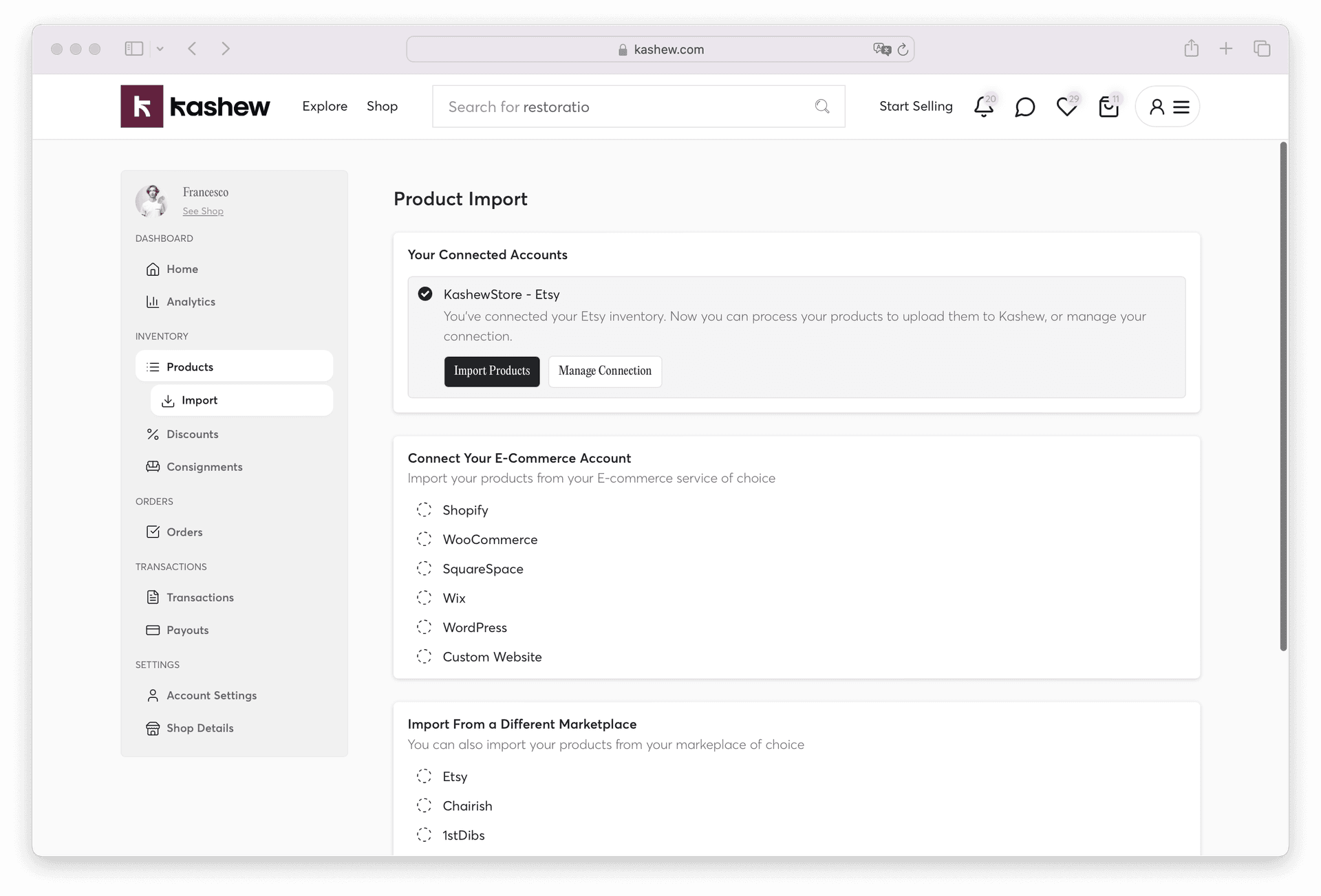
Bulk imports are one of the most loved features on Kashew — the vast majority of our top-performing dealers use them to keep their Kashew catalog perfectly in sync with the platforms they already use every day. Instead of manually re-listing each item on Kashew, you connect your existing store once and we do the rest.
Thousands of sellers rely on bulk imports to save time, stay organized, and sell more. Once set up, it is completely hands-off — your Kashew catalog updates automatically, in the background, 24/7.
Why sellers love bulk imports
- Set it once, forget it forever. After the initial connection, your catalog stays in sync automatically.
- No double work. You keep managing your inventory on your usual platform — Kashew simply mirrors it.
- Always up to date. Sold items come off, new items go up, edits are reflected — without you lifting a finger.
- Faster time-to-market. The moment a product is ready on your source platform, it starts getting exposure on Kashew.
- Massive scale. Whether you have 20 products or 20,000, bulk imports handle it effortlessly.
How it works: the "reflect" strategy
When you connect an external account to Kashew, that catalog feed is synced regularly by our system. Your import channel is treated as the "source of truth" — meaning our system always attempts to make your Kashew catalog look exactly the same as your connected source.
Here is what that looks like in practice:
- If you add a product on your source platform → it is added to Kashew
- If you edit a product on your source platform → the change is reflected on Kashew (unless you've manually edited that field on Kashew — see below)
- If you remove a product from your source platform → it is removed from Kashew
- If you create a product directly on Kashew that is not present on your source platform → it stays on Kashew and is never removed by the sync
This "reflect" approach keeps things simple and predictable: your source platform stays in charge of everything you haven't touched, while any change you make by hand on Kashew is respected.
Your manual changes are protected
You are never locked out of editing on Kashew. When you make a change by hand, the sync preserves it instead of overwriting it on the next import:
- Products you create on Kashew stay put. If you add a listing directly on Kashew that doesn't exist on your connected platform, the sync will never mark it as sold or remove it.
- Fields you edit by hand are locked to your value. If you change a field on a synced product — for example correcting the weight from 40 to 50 lbs, or rewriting the title or price — that specific field keeps your value on every future import, even if your source platform still shows the old one.
- Everything you didn't touch keeps syncing. Protection is per-field. On the same product, the fields you edited stay as you set them, while all the other fields keep updating automatically from your source.
Example: your platform has a chair with a weight of 40 lbs. You manually set its weight to 50 lbs on Kashew and also add a brand-new product directly on Kashew. On the next sync, the chair keeps its 50 lbs weight (while its price, description, photos, and everything else still update from your platform), and your new product is left completely untouched.
If you'd rather a field go back to syncing from your platform, contact us at [email protected] and we can reset it for you.
Which platforms we support
Kashew connects to all of the most popular e-commerce platforms and marketplaces used by resale dealers and home goods sellers:
E-commerce platforms
- Shopify
- WooCommerce
- Adobe Commerce (Magento)
- SquareSpace
- Wix
- WordPress
- Custom websites (via feed or custom integration)
Marketplaces
- Chairish
- 1stDibs
- Etsy
- eBay
- EstateSales.net
- Craigslist
- OfferUp
Other
- CSV file upload — for one-time or manual bulk uploads from any spreadsheet
You can connect multiple accounts at once (for example, two Shopify stores, or a Shopify + Chairish combination) and Kashew will merge them into a single catalog.
How to connect your first account
1. Go to your Products → Import tab.
2. Pick the platform you want to connect from the list.
3. Follow the platform-specific steps (most take under a minute — usually a quick login or pasting in a URL / API key).
4. Click "Process upload" or "Import products" to kick off the first sync.
From that point on, the sync runs automatically on a recurring schedule. You don't need to manually re-import anything.
How often does it sync?
Syncing is not instant — our system re-syncs your catalog on a recurring basis, and changes can take up to 12 hours to be reflected on Kashew. This is normal and expected: we batch updates to keep syncs reliable and efficient across thousands of stores.
For most dealers, this cadence is more than enough: you edit on your source platform once, and within a few hours Kashew is up to date.
Choosing the right source of truth
If you sell on multiple platforms, we strongly recommend connecting Kashew to your main inventory system — the first place products are entered. For most dealers this is:
- Their Shopify or WooCommerce store
- Their inventory management software
- Their own website
Avoid syncing from secondary platforms like Chairish or Craigslist when possible. Here's why:
- Approval delays — some marketplaces take hours or days to approve new listings, which delays when products appear on Kashew.
- Incomplete inventory — not every product you own is necessarily listed on every marketplace, but your main inventory system usually has everything.
- Better data quality — your primary system typically has the most complete product information (dimensions, descriptions, photos, brand, materials).
See How to maximize your store's potential for more tips on optimizing your imports.
What gets imported
Kashew pulls in as much information as possible from your source platform, including:
- Title and description
- Price
- Photos
- Dimensions, materials, weight (when available)
- Brand, style, colors
- Inventory status (available / sold)
- Shipping fees (if your platform has them set)
If some fields are missing on your source (e.g. weight or dimensions), Kashew's AI-generated attributes will automatically fill them in so your listings stay discoverable and shippable.
Managing your connection
You can manage any connected account from the Import tab. From there you can:
- Manually trigger a new sync
- See the progress of the current upload
- View past upload logs and errors
- Disconnect an account
- Connect additional accounts
Frequently asked questions
Can I edit a product directly on Kashew?
Yes. Any field you edit by hand is preserved and will no longer be overwritten by the sync — only the fields you changed are locked, while everything else keeps syncing from your source. If you later want a locked field to sync from your platform again, contact support and we can reset it.
Will a product I create on Kashew get removed by the sync?
No. Products you create directly on Kashew are treated as yours — the sync will never mark them as sold or remove them, even though they don't exist on your connected platform.
What if I delete something on Kashew?
If the product still exists on your source platform, it may be re-added on the next sync. To permanently remove an imported product from Kashew, remove it from your source.
Can I connect more than one platform?
Yes — you can connect multiple sources at the same time. Most sellers use one main source (e.g. Shopify) and occasionally add a CSV upload for special batches.
Is there a fee for bulk imports?
No. Bulk imports are completely free and included with your Kashew account.
Can I import from a platform you don't support yet?
Yes — use the CSV File option or contact us. We regularly add new integrations based on seller requests.
If you need help getting your bulk import set up, or have questions about a specific platform, contact us at [email protected] or call +1 (213) 556-2728. We'd love to help you get your full catalog on Kashew as fast as possible.
Related articles
If you need more help, don't hesitate to reach out to us at:
Or by phone: